The Storm That Wasn't Uri
Winter Storm Fern hit Texas on January 24–27, 2026 — almost exactly five years after Uri knocked out power for 4.5 million homes and became shorthand for grid failure. The "renewables failed" headline returned immediately. Solar was generating 0 MW at 6 AM during peak morning stress. Over 14,000 MW of wind and solar capacity went offline. The takes wrote themselves.
But the grid held. About 50,000 homes lost power briefly, compared to 4.5 million during Uri. The difference? Battery storage delivered 7,000 MW at peak morning demand — 9.5% of ERCOT's total load — from infrastructure that barely existed in 2021. The Department of Energy issued an emergency order under Section 202(c) of the Federal Power Act, but as a precaution, not a bailout. Wholesale prices spiked but didn't spiral. The structural investments since Uri — weatherization mandates, battery buildout, grid hardening — worked.
The more interesting question isn't whether the grid survived. It's what happens next, as rooftop solar penetration keeps climbing. And the answer requires a kind of analysis that most utilities aren't set up to do yet — but that any analyst with Python and a free dataset can start doing today.
The Hidden Problem: Solar Whiteout Demand Swing
Here's the scenario that keeps grid planners up at night.
On a normal sunny day in Houston, a neighborhood with 20% rooftop solar penetration looks like it's drawing 80% of its actual building load from the grid. The other 20% is offset by local generation. The utility's demand forecast sees 80%, plans for 80%, dispatches for 80%.
Then a winter storm rolls in. Snow covers panels. Clouds cut irradiance to near zero. Solar output drops from 20% to 0%. The grid suddenly sees the full 100% of building load — a 25% jump in apparent demand from that neighborhood, with no warning in the forecast.
Scale this across a metro area with uneven solar adoption, and you get demand spikes that are invisible to any utility that doesn't track solar penetration at the neighborhood level. The swing is proportional to solar penetration: a neighborhood at 40% solar sees a potential 67% demand swing. At 10%, it's 11%. The math is simple. The problem is that most utilities don't have the neighborhood-level data to do the math.
This is the "solar whiteout demand swing" — and it gets worse every year as rooftop solar adoption accelerates.
What You Need: Two Data Sources
To quantify this risk for a specific metro area, you need two things:
- Building consumption data — NREL ResStock gives you physics-based energy consumption by end use for every residential building type in the US, at county and PUMA (Public Use Microdata Area) resolution. Free, public, no credentials required.
- Solar production data — the actual generation output from solar farms or rooftop systems in your service territory. This comes from inverter monitoring platforms (SMA Sunny Portal, Enphase Enlighten, SolarEdge, etc.) in whatever format the OEM exports. ODS-E normalizes these heterogeneous feeds into a common schema so they can be joined with building data for analysis.
This article uses the ResStock 2024 Release 2 baseline for Texas (free, from the OEDI S3 bucket) plus production data from a fictional 5 MW solar farm — generated synthetically but structured exactly like real inverter output, then normalized through ODS-E.
Step 0: Download the Data
You need the AWS CLI (any version) and about 130 MB of disk space:
aws s3 cp --no-sign-request \
  "s3://oedi-data-lake/nrel-pds-building-stock/end-use-load-profiles-for-us-building-stock/2024/resstock_tmy3_release_2/metadata_and_annual_results/by_state/state=TX/csv/TX_baseline_metadata_and_annual_results.csv" \
  ./texas_resstock_baseline.csv
This gives you 43,089 building models across all of Texas, with 289 columns covering building characteristics (in.* columns), simulated energy consumption by end use (out.* columns), and a weight column that tells you how many real buildings each model represents.
Step 1: Profile Your County's Building Stock
Load the data and filter to Harris County (Houston metro):
import pandas as pd

df = pd.read_csv("texas_resstock_baseline.csv", low_memory=False)

# Harris County, TX — GISJOIN code G4802010
harris = df[df["in.county"] == "G4802010"].copy()
print(f"Harris County: {len(harris):,} models")
print(f"Representing: {harris['weight'].sum():,.0f} dwellings")
Result: 6,967 building models representing 1,757,786 dwellings. Each model is a statistically representative sample — the weight column scales it to the real building count.
Now look at heating demand by building vintage. During a winter storm, heating is the dominant load — and older buildings use dramatically more:
heating_col = "out.electricity.heating.energy_consumption.kwh"

vintage_heating = (
    harris.groupby("in.vintage")
    .apply(lambda g: (g[heating_col] * g["weight"]).sum() / g["weight"].sum(),
           include_groups=False)
    .sort_index()
)

print("Heating electricity by construction era (kWh/dwelling/year):")
for vintage, kwh in vintage_heating.items():
    print(f"  {vintage:<20} {kwh:>8,.0f}")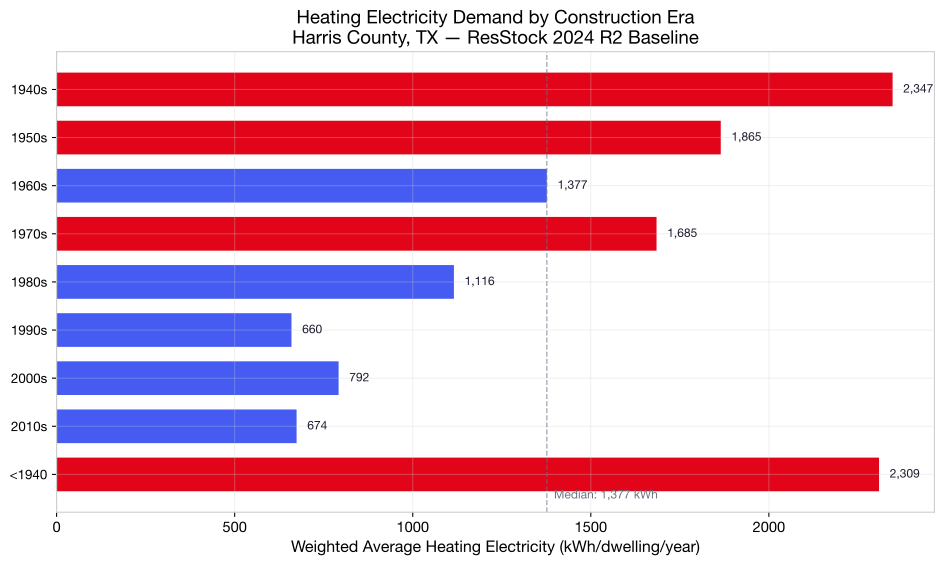
Harris County heating electricity by construction era. Pre-1940 homes draw 3.4× more heating power than 2010s construction. Source: ResStock 2024 R2 baseline.
The insight: during a freeze, neighborhoods with older housing stock draw dramatically more heating power. A pre-1940 home uses 2,309 kWh of electric heating annually versus 674 kWh for a 2010s home — a 3.4× difference. When you're trying to predict where storm demand will spike, building age is one of the strongest signals in the data.
Step 2: Your Solar Farm's Data
You're a utility analyst. Your grid planning team just got a data export from Bayou Solar Farm — a 5 MW ground-mounted installation in eastern Harris County that feeds into several neighborhoods via the local distribution grid. The data is a raw CSV from the farm's SMA Sunny Portal.
Here's what it looks like:
Timestamp,Total Power (kW),Grid Frequency (Hz),Status,Daily Yield (kWh)
2026-01-20 07:00:00,142.3,60.01,Ok,0.0
2026-01-20 07:05:00,287.6,60.00,Ok,23.9
2026-01-20 12:00:00,3487.2,59.98,Ok,10241.5
2026-01-20 18:30:00,12.1,60.02,Ok,19847.3
...
2026-01-25 12:00:00,203.4,59.97,Warning,892.1
2026-01-25 12:05:00,0.0,59.96,Disturbance,892.1
2026-01-25 12:10:00,87.2,60.01,Warning,899.4
On normal January days, the farm peaks around 3,500 kW at midday and produces roughly 19–21 MWh per day. Then Fern arrives. On January 25 — the worst day — ice coats the trackers, clouds cut irradiance to near zero, and the inverters cycle between Warning and Disturbance states. Daily production drops to 1.2 MWh. The farm effectively goes dark.
Normalize with ODS-E
Raw SMA exports can't be directly joined with ResStock building data — the column names, timestamp formats, energy semantics, and status codes are all SMA-specific. This is where ODS-E comes in. Transform the raw CSV into standardized energy-timeseries records:
from odse import transform

# Transform raw SMA Sunny Portal export to ODS-E
records = transform(
    "bayou_solar_farm_export.csv",
    source="csv",
    asset_id="BAYOU-SOLAR-001",
    mapping={
        "timestamp": "Timestamp",
        "power_kw": "Total Power (kW)",
        "error_type": "Status",
    },
    error_code_mapping={
        "normal": ["Ok"],
        "warning": ["Warning"],
        "critical": ["Disturbance", "Off"],
    },
    interval_minutes=5,
)

print(f"Transformed {len(records)} records")
Each record now looks like this — regardless of whether the original data came from SMA, Enphase, SolarEdge, or any other OEM:
// Normal production — clear day
{
  "timestamp": "2026-01-20T12:00:00-06:00",
  "kWh": 29.1,
  "error_type": "normal",
  "direction": "generation"
}

// Storm day — inverter struggling
{
  "timestamp": "2026-01-25T12:00:00-06:00",
  "kWh": 1.7,
  "error_type": "warning",
  "direction": "generation"
}
And the asset metadata record for the farm:
{
  "asset_id": "BAYOU-SOLAR-001",
  "asset_type": "solar_pv",
  "capacity_kw": 5000,
  "site_id": "bayou-solar-farm",
  "oem": "SMA",
  "location": {
    "latitude": 29.78,
    "longitude": -95.18,
    "timezone": "America/Chicago",
    "county": "Harris County",
    "state": "TX"
  }
}
Now aggregate the ODS-E records to daily production:
import pandas as pd

production = pd.DataFrame(records)
production["date"] = pd.to_datetime(production["timestamp"]).dt.date
daily = production.groupby("date")["kWh"].sum() / 1000  # MWh

for date, mwh in daily.items():
    marker = " << STORM" if date.day in [24, 25, 26, 27] else ""
    print(f"  {date}: {mwh:>6.1f} MWh{marker}")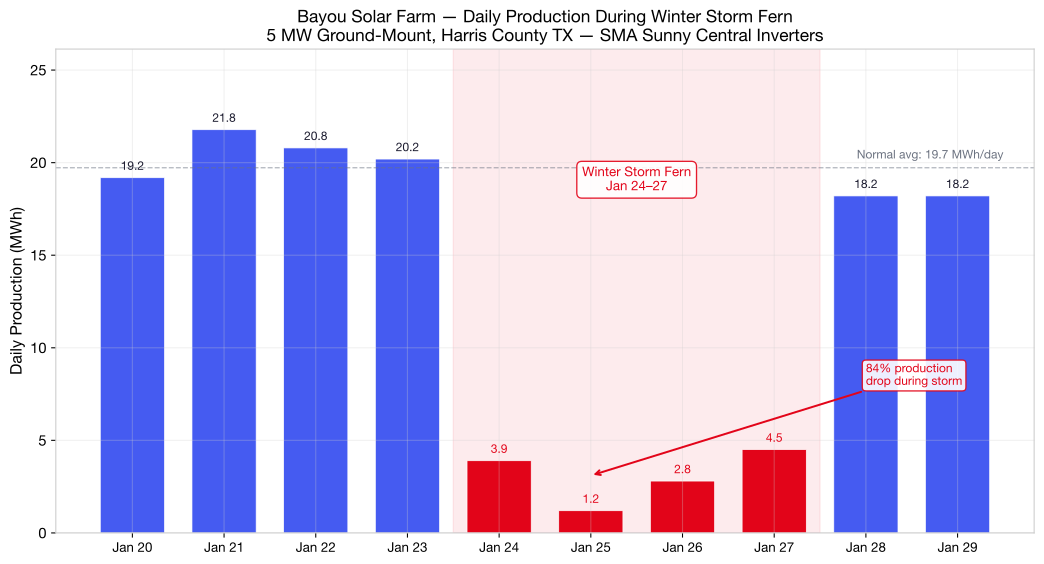
Bayou Solar Farm daily production during Winter Storm Fern. Normal January output: ~20 MWh/day. Storm days (red): production collapses 85%, bottoming at 1.2 MWh on Jan 25.
The chart tells the story: 20 MWh/day of solar generation that neighborhoods were counting on — suddenly gone. For four days, the grid has to supply that load directly. The question is which neighborhoods feel it most.
Step 3: Calculate the Demand Swing
Now join the two datasets: ODS-E solar production (what the farm normally generates) with ResStock building consumption (what the neighborhoods actually need). The difference on a storm day is the demand swing.
energy_col = "out.site_energy.total.energy_consumption.kwh"

# Per-PUMA total building consumption from ResStock
puma_consumption = harris.groupby("in.puma").agg(
    total_energy_gwh=pd.NamedAgg(
        column=energy_col,
        aggfunc=lambda x: (x * harris.loc[x.index, "weight"]).sum() / 1_000_000
    ),
    total_dwellings=pd.NamedAgg(column="weight", aggfunc="sum")
).sort_values("total_energy_gwh", ascending=False)

# From ODS-E records: Bayou Solar Farm normal daily production
normal_daily_mwh = 19.8   # from our aggregated ODS-E data
storm_daily_mwh = 2.4     # average during Fern (Jan 24-27)

# The farm serves ~12,000 homes across several PUMAs
# On a normal day: 19.8 MWh offsets grid demand
# On a storm day: only 2.4 MWh — grid must supply the missing 17.4 MWh
demand_swing_mwh = normal_daily_mwh - storm_daily_mwh

print(f"Normal daily farm output:  {normal_daily_mwh:.1f} MWh")
print(f"Storm daily farm output:   {storm_daily_mwh:.1f} MWh")
print(f"Daily demand swing:        {demand_swing_mwh:.1f} MWh")
print(f"4-day storm total swing:   {demand_swing_mwh * 4:.1f} MWh")
That's 17.4 MWh per day of extra grid demand during the storm — and that's just one 5 MW farm. Harris County has multiple solar installations. Scale this across the county's total solar capacity at projected future penetration levels:
# Scale to projected county-wide solar capacity
# Current: ~30 MW installed. Projected: 150 MW (5x), 500 MW (16x)
for capacity_mw, label in [(30, "Current ~30 MW"), (150, "Near-term 150 MW"),
                            (500, "Projected 500 MW")]:
    scale = capacity_mw / 5  # relative to our 5 MW farm
    swing = demand_swing_mwh * scale
    print(f"  {label:<22} Daily storm swing: {swing:>7.0f} MWh  "
          f"({swing/1000:.1f} GWh over 4 days)")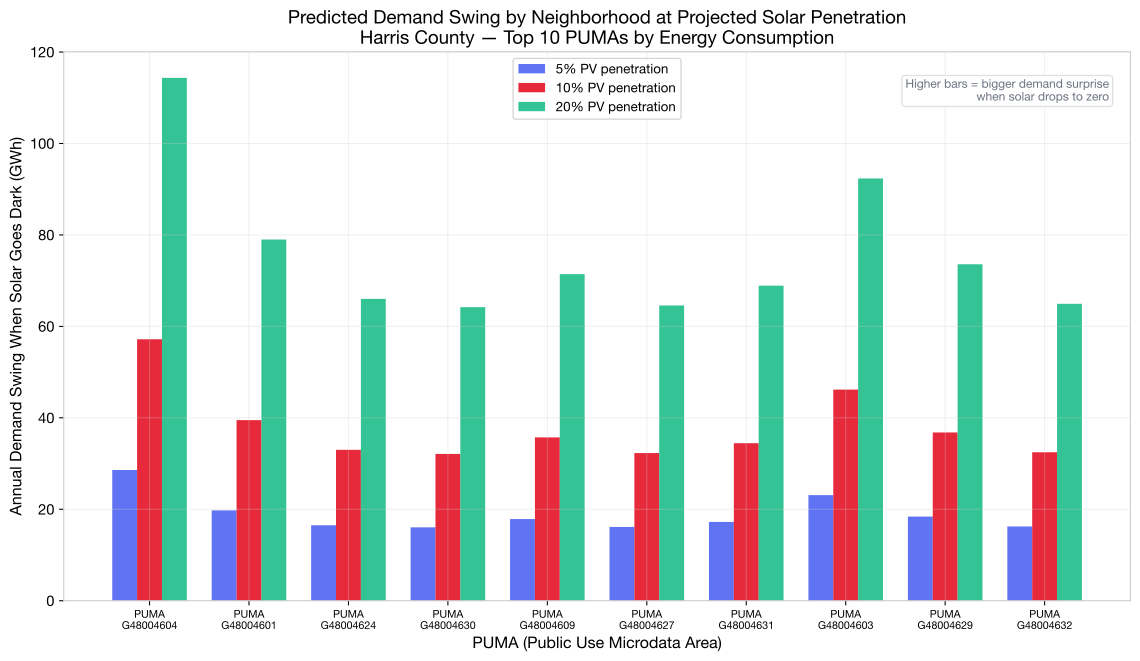
Predicted demand swing by PUMA when solar drops to zero, at three projected penetration levels. Higher bars = bigger demand surprise during a storm. Source: ResStock 2024 R2 baseline + ODS-E production data, Harris County.
At projected 500 MW county-wide solar capacity, a Fern-like storm creates a 1,740 MWh daily demand swing — nearly 7 GWh over a four-day event. The critical question for grid planners isn't the aggregate number. It's which neighborhoods absorb that swing, and whether those neighborhoods also happen to have the highest heating demand.
Step 4: Map Storm Vulnerability by Neighborhood
The real power of this analysis comes from putting it on a map. Not all demand swing is equal — a neighborhood that has high solar dependency and older housing stock and electric heating is a qualitatively different risk than one with new construction and heat pumps.
Combine four signals from the ResStock data into a composite vulnerability score, then map it onto actual Harris County PUMA boundaries using Census TIGER shapefiles:
import numpy as np
import geopandas as gpd

heating_col = "out.electricity.heating.energy_consumption.kwh"

# Build per-PUMA risk factors from ResStock
puma_risk = harris.groupby("in.puma").apply(
    lambda g: pd.Series({
        "heating_intensity": (
            (g[heating_col] * g["weight"]).sum() / g["weight"].sum()
        ),
        "dwelling_count": g["weight"].sum(),
        "pre_1980_pct": (
            g[g["in.vintage"].isin([
                v for v in g["in.vintage"].unique()
                if any(era in str(v) for era in
                       ["<1940", "1940s", "1950s", "1960s", "1970s"])
            ])]["weight"].sum() / g["weight"].sum() * 100
        ),
        "electric_heat_pct": (
            g[g["in.hvac_heating_type_and_fuel"].str.contains(
                "Electric", na=False
            )]["weight"].sum() / g["weight"].sum() * 100
        ),
    }),
    include_groups=False
)

# Normalize each factor to 0-1
for col in puma_risk.columns:
    lo, hi = puma_risk[col].min(), puma_risk[col].max()
    puma_risk[col] = (puma_risk[col] - lo) / (hi - lo) if hi > lo else 0.5

# Composite vulnerability score
puma_risk["vulnerability"] = (
    puma_risk["heating_intensity"] * 0.30 +
    puma_risk["dwelling_count"] * 0.25 +
    puma_risk["pre_1980_pct"] * 0.25 +
    puma_risk["electric_heat_pct"] * 0.20
)
Now load the Census TIGER 2020 PUMA boundaries (the same boundaries ResStock uses) and join the scores:
# Download PUMA shapefile for Texas:
# https://www2.census.gov/geo/tiger/TIGER2022/PUMA/tl_2022_48_puma20.zip

gdf = gpd.read_file("tl_2022_48_puma20/tl_2022_48_puma20.shp")

# Map ResStock PUMA codes to Census: G48004601 → 04601
puma_risk["PUMACE20"] = puma_risk.index.str.replace("G480", "")

# Filter to Harris County and join
harris_gdf = gdf[gdf["PUMACE20"].isin(puma_risk["PUMACE20"])].copy()
harris_gdf = harris_gdf.merge(puma_risk[["PUMACE20", "vulnerability"]],
                               on="PUMACE20")

# Plot choropleth
harris_gdf.plot(column="vulnerability", cmap="YlOrRd",
                legend=True, edgecolor="white", linewidth=0.8)
plt.title("Storm Demand Vulnerability — Harris County PUMAs")
plt.axis("off")
plt.savefig("harris_county_vulnerability.svg")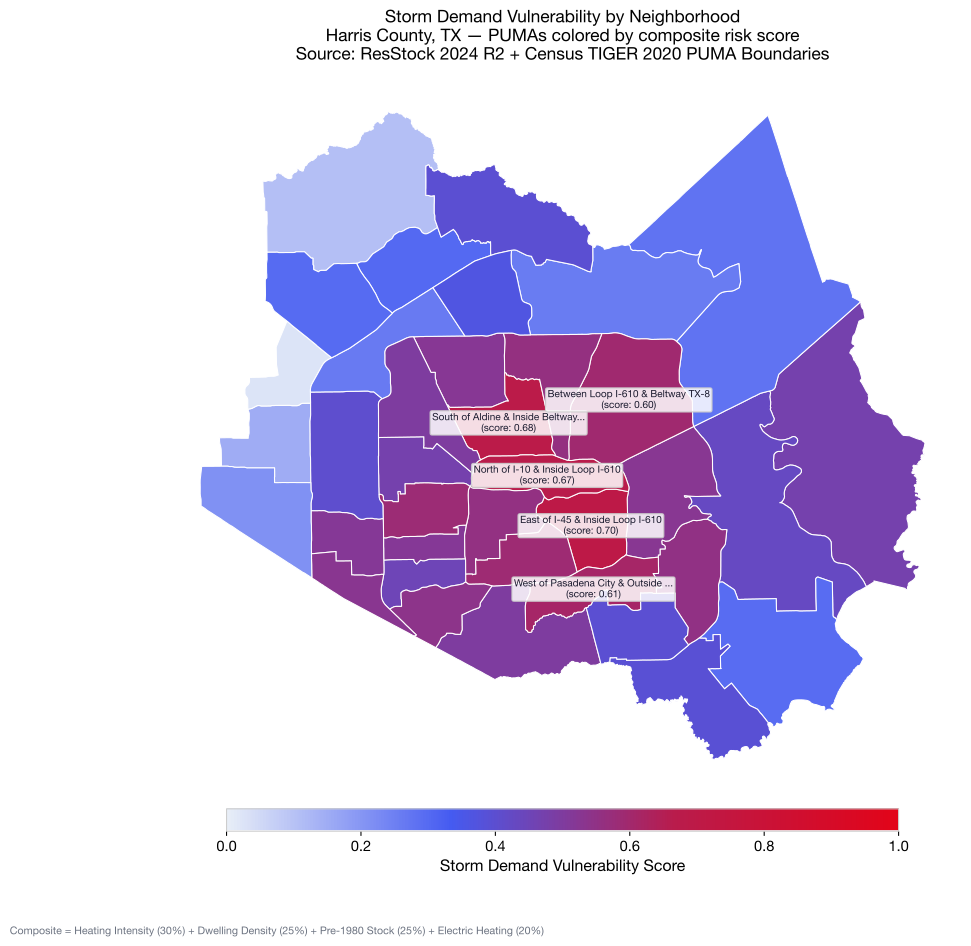
Storm demand vulnerability by Harris County neighborhood (PUMA). Composite score: heating intensity (30%), dwelling density (25%), pre-1980 stock (25%), electric heating (20%). Darker = higher risk. Source: ResStock 2024 R2 + Census TIGER 2020 PUMA boundaries.
The map reveals the geography of risk. The most vulnerable PUMAs cluster in Houston's inner core — East Central Houston, North Houston inside the Beltway, and North Central Houston inside Loop I-610. These neighborhoods combine the worst risk factors: dense older housing stock with high heating demand and significant electric heating dependency. During a storm like Fern, these are the areas where demand spikes hardest — and where solar production loss is felt most acutely on the distribution grid.
What Fern Actually Showed Us
Winter Storm Fern wasn't a failure. It was a proof point for $14 billion in grid investment since Uri. Battery storage alone delivered 7,000 MW at peak — capacity that didn't exist five years ago. Weatherization mandates reduced residential demand during the cold snap. The emergency order was precautionary.
But Fern also previewed the next planning challenge. Solar at 0 MW during a pre-dawn winter peak isn't a failure of solar — it's a structural fact about solar physics. The planning question is what happens when a growing share of a metro area's load is normally offset by solar generation, and then that generation disappears in a storm. The swing is predictable, locatable, and quantifiable. It just requires two things most utilities don't combine today: normalized solar production data and neighborhood-level building consumption profiles.
That's exactly what this analysis demonstrates. ODS-E normalizes the solar farm's inverter data into a standard schema — regardless of whether it comes from SMA, Enphase, SolarEdge, or any other OEM. ResStock provides the building-level consumption baseline. Joining them gives you a neighborhood-by-neighborhood storm vulnerability map that no single data source can produce alone.
The analysis takes about an hour. The building data is free (ResStock 2024 R2, modeled from actual building stock surveys and NOAA weather). The ODS-E transform is open source. The code is reproducible — download the same CSV, run the same steps, get the same results. No proprietary platform required. We've packaged the entire workflow as a self-contained Jupyter notebook with bundled SMA data — it installs its own dependencies, downloads ResStock and the Census PUMA shapefile, and reproduces every chart in this article.
That's the "citizen data scientist" version of storm readiness: one analyst, two datasets, one afternoon, and a forecast that most utilities don't have.
Try It Yourself
- Jupyter Notebook — Self-contained notebook with bundled data to reproduce this entire analysis
- Accessing the Data — Step-by-step download instructions for ResStock and ComStock
- Municipal Emissions Attribution — Disaggregate CO₂ by building sector, vintage, and end use
- Cross-City Benchmarking — Compare multiple cities using the same methodology
- ComStock & ResStock Guide — What the datasets are and how they connect to ODS-E
- ODS-E on GitHub — Schema definitions, transforms, and validation tools